General
General
|
|
|
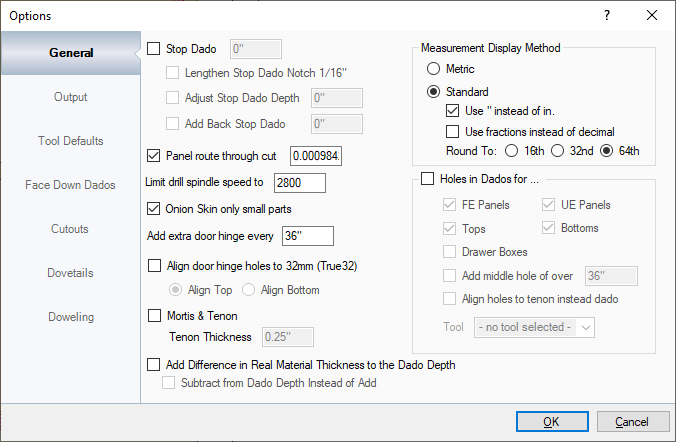
This section sets the general options that set up the entire program. Stop Dado: This doesn't change the size of the part that goes into that dado, this creates a notch in the part that fits into the dado by whatever value that is set. This is normally for Euro style cabinets to so Edge Banding machines can smoothly edge band a part without damaging the part or machine. It is also recommended for the Mortis & Tenon joint.
Panel Route Through Cut: This information is added to the final pass of the Route cut and is designed to cut barely into the spoil board to ensure that parts are cut out completely. Limit Drill Spindle Speed to: This is mainly used for machines that have a separate drill or line boring head on it. If the spindle speed is too fast on that separate drill or line boring head, the gears can strip and damage the machine. The max speed allowed in this field is 3200rpm. Onion Skin only Small Parts: If onion skin is set in the Materials and Tools settings, this will cut out only what is set below the Small Part Threshold. The Small Part Threshold is set in EnRoute. NOTE: If DXF is selected in the Output section, small part information will be ignored. Add Extra Door Hinge every ____: In cases where the cabinet is large and the doors are heavy, an extra door hinge can be added at specified distances. Align door hinge holes to 32mm (True32): This will align your door hinge holes to 32mm increments. Please note that this is specifically for the True32 method, where the entire job is built in 32mm increments.
Mortis & Tenon: This is also sometimes called a Qualified Tenon. Instead of a normal dado, this method thins down the dado to act as a Mortis and Tenon joint. This does not create a stronger dado but makes the cabinet handed, meaning it can only be put together one way. NOTE: THIS REQUIRES A FRONT AND BACK STOP DADO DISTANCE TO BE SET IN ORDER TO WORK CORRECTLY. Add Difference in Real Material Thickness to the Dado Depth: In cases where the entire job is created out of the exact same material and thickness, the Real Material Thickness can change the size of the cabinet because the material can be Thicker or Thinner than what was created in the Cabinet Solutions Designer. What changes that can be anything from how much moisture is in the air, or time of year for how hot it is, for example. When these changes happen, the depth of the dado needs to be cut deeper by Adding Difference or Subtracting Difference to make it shallower. Measurement Display Method: This section changes if measurements are displayed in Metric or Standard. Please note that you can still use "mm" after a value if you want it specified in metric while everything is in standard or the " or in. if you want it displayed in inches while everything is in metric. Holes in Dados For: This section will add holes in dados for selected parts. Keep in mind, these holes go all the way through the panels. It's designed to screw the cabinet or drawers together from the outside. |