Adjustable Shelves
Adjustable Shelves
Opening Standards: Adjustable Shelves
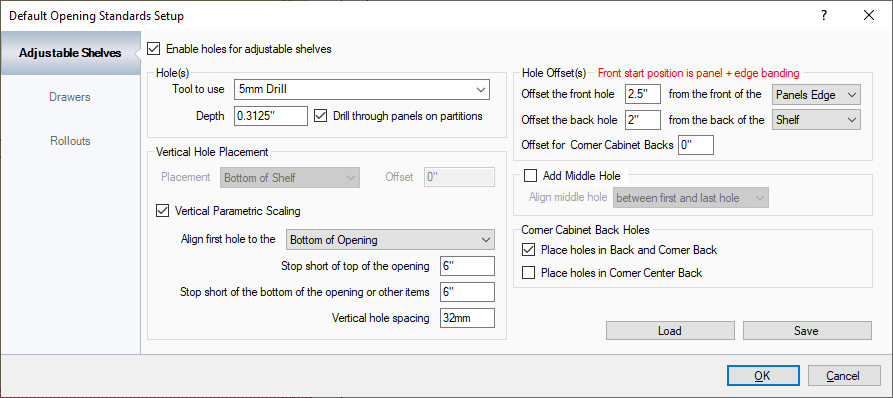
Any cabinet brought into the Cabinet Solutions CNC Workshop is governed by the information listed in this tab.
Holes: (IF UNITS ARE SET TO STANDARD IN THE OPTIONS, GENERAL TAB, ALL UNITS BY DEFAULT ARE IN INCHES. TO TYPE IN METRIC, TYPE mm AFTER THE DIMENSION THAT IS ENTERED. TO MAKE EVERYTHING IN METRIC, SEE THE OPTIONS, GENERAL TAB.):
- Tool to Use: The Tool to Use is brought up from Tool Library in EnRoute. If the tool doesn't exist in this list, it must be created in EnRoute.
- Depth: Depth of drilling into the panel for adjustable shelf pins to be placed.
- Drill through panels on partitions: This option is available if the holes should be drilled through on partitions only.
Vertical Hole Placement:
- Placement: By default this area is grayed out unless Vertical Parametric Scaling is de-selected. In Cabinet Solutions, shelf positions can be set up per cabinet, in the Custom Cabinet section of the program. This is used if the adjustable shelf holes will be placed for one position.
- Offset: This changes the hole location by whatever distance is specified.
- Vertical Parametric Scaling: With this option selected, a parametric bore line is created with the information specified.
- Align first hole to the Bottom of Opening/Top of Opening: The CNC Workshop reads the openings of the cabinets to adjust for any partitions differing in size depending on dados. With this feature, the first hole can be aligned to the Top or Bottom of the opening.
- Stop Short of the Top of the Opening: From the top of the opening, the line bore will not go any closer to than this value.
- Stop Short of the Bottom of the Opening: From the bottom of the opening, the line bore will not go any closer to than this value.
- Vertical Hole Spacing: This is the distance between holes in the line bore. By default the distance is 32mm.
Front/Back Hole Offset(s): This section sets the offsets of the line bore. CAUTION: FRONT START POSITIONS ARE PANEL INCLUDING EDGEBANDING.
- Offset the front of the hole _____ from the front of the _____: This value sets the offset of the front line bore a certain distance from the front of either the panels edge, or the shelf, if the shelf is smaller than the depth of the cabinet.
- Offset the back hole _____ from the back of the _____: This value sets the offset of the back line bore a certain distance from the back of either the shelf, or the panels edge, if the shelf is smaller than the depth of the cabinet.
Add Middle Hole: If a middle hole is needed, place a check mark. The middle hole can be aligned between the first and last hole or to the middle of the shelf.
The values in this window can be Saved to whatever name and whatever location that is specified, and also loaded from that location as well.