Board Routing

Tools: Board Routing


This section is where the tools used for Through Cuts are set.

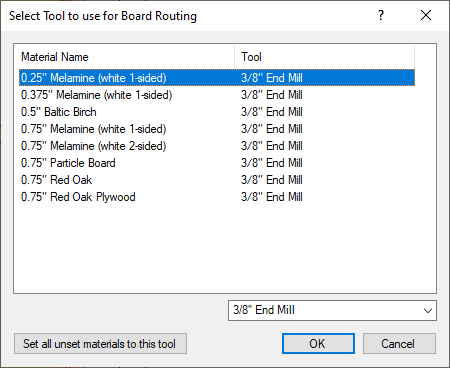
  • Main Window: Information is broken down into 2 sections, Material Name and Tool. 
  • Material Name: This section displays the material used in the current job. Each time a material with the same thickness is used in the future, the tool that was used previously and the information is stored so there is no need to re-enter it every time.
  • Tool List: This list is pulled directly from EnRoute's ToolLibrary.ini file. Every time a tool is created in EnRoute, the tool will appear on this list after EnRoute is closed completely.

Set all unset materials to this tool: This feature is designed to set all new materials to a tool specified in the Tool List drop down. More designed for a single bit machine or for a setups that have a main bit that they use to through cut panels.

If there are any materials that are not cut out for any reason, -no tool selected- can be selected from the list to eliminate the through cut for that material.