|
This section is designed to make dado creation and tool-pathing easy to set up.
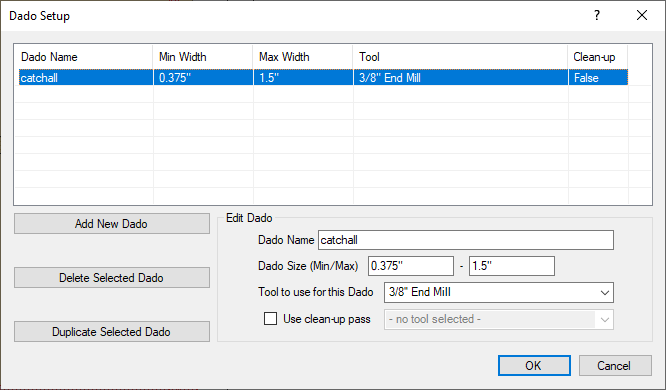
Main Window: This displays the information from below after it has been entered into the system. It is broken into sections to make it easier to be read. The sections are Dado Name, Min Width, Max Width, Tool, Cleanup.
- Dado Name: This section is where the dado can be named. The dado name is used to identify the dado type in the dialog box as it is applied to the dado.
- Min/Max Width: This section displays the minimum and maximum dado width that can be cut with the tool that is selected. If the dado width is smaller than the Tool information in the Tool Library in EnRoute, then that dado will be skipped. Please make sure that the Tool size in EnRoute's Tool Library is smaller than the width that is set for the minimum size. If the maximum size is larger than the bit size, the CNC Workshop will send the information to EnRoute to make multiple passes automatically.
- Tool to use for this Dado: This section brings up a tool list that is created from the Tool Library in EnRoute Wood.
- Use clean-up pass: If a clean up pass is needed for the dado, another tool can be selected from the drop down list.
Add New Dado: This section is for creating new dado tool path for cuts.
Delete Selected Dado: This section is for removing dado information.
Duplicate Selected Dado: After a type of dado is selected, this option allows quick duplication for quick dado changes.
|