Materials and Tools Settings
Materials and Tools Settings
Tools: Materials and Tools Settings
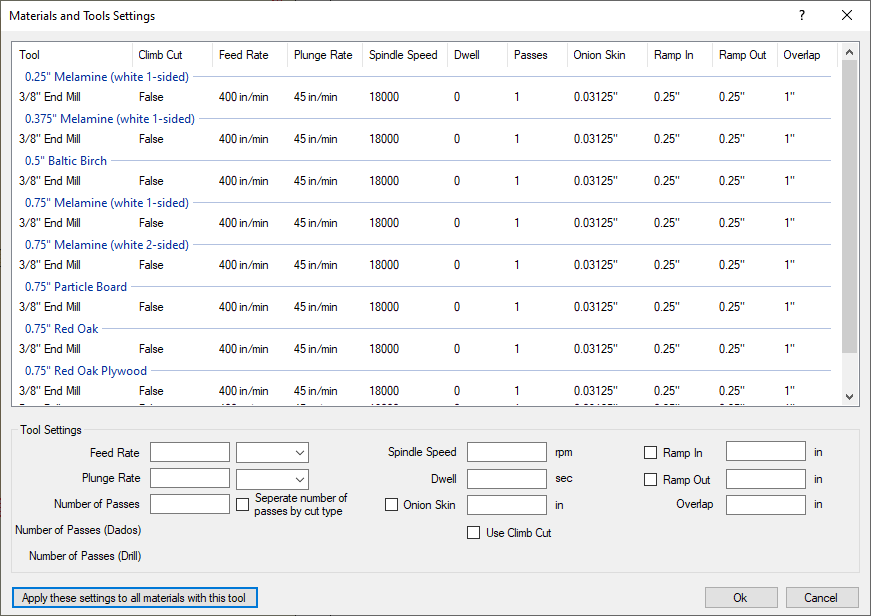
This section is where all of the tools are applied to the different materials. The information in this section sets up the Strategies for each tool on each material sorted by thickness.
Main Window: This section lists the information and what is currently set for the each tool and each material for which that tool is being applied to. Each time a tool is set up for dados or for through cuts, that tool is then displayed on this screen to be set up.
Tool Settings: This section is where all of the information is set up for each bit. Each part is broken down as follows:
- Feed Rate: This handles the feed rate or how many inches/centimeters/millimeters per second/minute.
- Plunge Rate: This handles how fast the bit plunges into the material. It also is handled in the same units as the Feed Rate. It is recommended to make the Plunge Rate to a slow number when first setting the machine up to allow for quick Emergency Shutdown if there are any possible errors.
- Number of Passes: If the bit is too small for the material, increase the number of passes to more than 1. This will take longer to make the cut on the machine but the risk to break the bit is much smaller.
- Spindle Speed: This allows the speed of the drill head to be increased/decreased depending on the material.
- Dwell: A Specified amount of time to allow the spindle to pause to reach the specified RPM so the motor doesn't bog down when cutting.
- Onion Skin: This option allows this bit to Onion Skin for the material so small parts don't shift on the table.
- Use Climb Cut: This option allows Climb Cutting to be done with this material.
- Ramp In/Out: These options allow the router to Ramp In/Out by a distance that is set up, rather than having the bit plunge into/out of the material.
- Overlap: This eliminates the hump between a Ramp In and a Ramp Out. This value should be the distance of the Ramp In and Ramp Out added together.
Apply these settings to all materials with this tool: If these settings are going to be duplicated for each material where the tool is applied to, this button allows the settings to automatically be filled in for that tool.