EnRoute
EnRoute
|
|
|
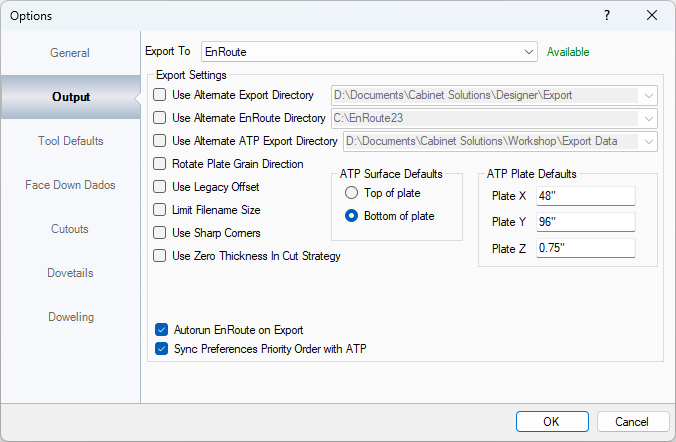
Information displayed here is only when EnRoute is set in the Export To section. This section sets how the Workshop interacts with EnRoute on Export. NOTE: THE MAJORITY OF THE INFOMATION IN THIS SECTION SHOULD NOT BE CHANGED ONCE SET. Use Alternate EnRoute Directory: This sets where EnRoute is installed. By default, it picks the latest version of EnRoute but if there's more than one version, you can specify where EnRoute is to be used. Use Alternate ATP Export Directory: This sets the ATP (Automatic Tool Path) file location that EnRoute uses to pull in all of the information for the Workshop. Rotate Plate Grain Direction: This can change the grain direction of the plate or sheet of material. Note: Before setting this option, make sure that the parts you are checking the grain direction on are NOT set to rotatable. Use Legacy Offset: This is only needed to be checked if the version of EnRoute is before version 6.1. This changes the command names of the coOffsetMale or coOffsetFemale to coOffset in the ATP File. Limit Filename Size: Some CNC machines can only read file names that are 8 characters long. Use Sharp Corners: Some CNC machines require this to be checked to make the corners on the route cuts sharp. Use Zero Thickness in Cut Strategy: This sets the finish depth to 0. If this is not set, it uses the part thickness. Autorun EnRoute on Export: This option will open EnRoute when parts are exported. NOTE: ENROUTE MUST BE CLOSED BEFORE EXPORT. Sync Preferences Priority Order with ATP: This syncs the priority order that EnRoute sets with the ATP. ATP Surface Defaults: This sets where the tools get touched off from when being zeroed out on your machine. The plate is the material, so Top of Plate, would be top of material. Bottom of the plate, would be Top of Spoil Board. ATP Plate Defaults: This sets the default starting information that's on the ATP in EnRoute. If your plate size is different than the standard, 48 x 96, you can set that information here, but make sure the Plate Z stays at .75" for accuracy. When information gets sent over from the Designer that's a different thickness, EnRoute will use that thickness instead. |