|
|
|
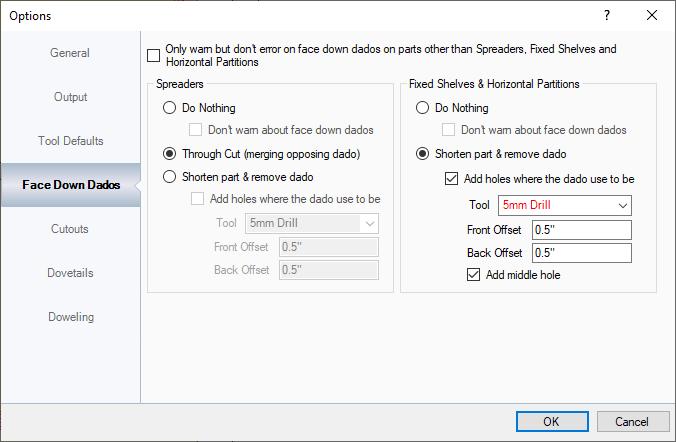
This area sets up how dados are set up for boards that have dados on either side, since machines can't cut on both sides of the material.
Only warn but don't error on face down dados on parts other than Spreaders, Fixed Shelves and Horizontal Partitions: When a panel has a dado on the face down side and is attempted to be exported to EnRoute, a warning will appear that displays the cabinet that has that panel and the export will not continue. With this option checked, a warning will be displayed but an alternate message saying that the panel will be ignored.
Spreaders:
- Do Nothing: This option tells the exporter not to do anything. The sub option also tells the Exporter to not even give a warning when the panel that has the dado face down is exported, just to export.
- Through Cut (merging opposing dado): If the spreaders are dadoed on both sides of the panel, this removes the dados, notches the panel and merges the spreader into one spreader.
- Shorten parts & remove dado: For face down parts, this option removes the dado on the face down side of the panel, and shortens the part that associates with that dado. On the face up side, the Exporter will add holes where the dado use to be so the part can be screwed into place.
Fixed Shelves & Horizontal Partitions:
- This information is the same as spreaders, except for fixed shelves, a middle hole can be added to support the weight on the horizontal partition or fixed shelf.
|