Part Information Tool Tips
Part Information Tool Tips
Cabinet Parts: Part Information Tool Tips
|
|
|
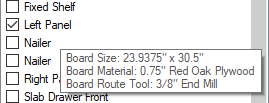
This information is displayed when the mouse hovers over a part on the left hand side of the screen. It displays the Board Size, Board Material and Board Route Tool, or what tool is used to cut the part out. That's not everything that is displayed as you'll see. |
|
|
|
|
|
|
|
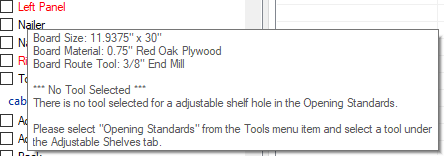
The other information that gets displayed happens when the part name is in RED and the part is not select-able for Export. Any time a part name is in RED, it means information is missing. If you hover your mouse over the item, it will display what information is missing and where to correct it at. In the example image to the left, there is NO TOOL SELECTED and then it displays that there is no tool selected to drill hinge holes and where to find that section in the program. This window does have a time out so you may need to hover your mouse over several times to find all of the information. |

This information is at the bottom left side of the screen and displays some of the information that is displayed in the tool tip except for 1 item, the Working Side.
The Working Side tells the program which side of the part is face up on the CNC machine. This is important for partitions in a cabinet as dados can be placed on either side of the part. The Workshop will try to give preference to the side of the part that has a Dado cut into vs a side that just has holes on it. More indepth info can be found in the Options: Face Down Dados section of this help file.