Dovetails
Dovetails
|
|
|
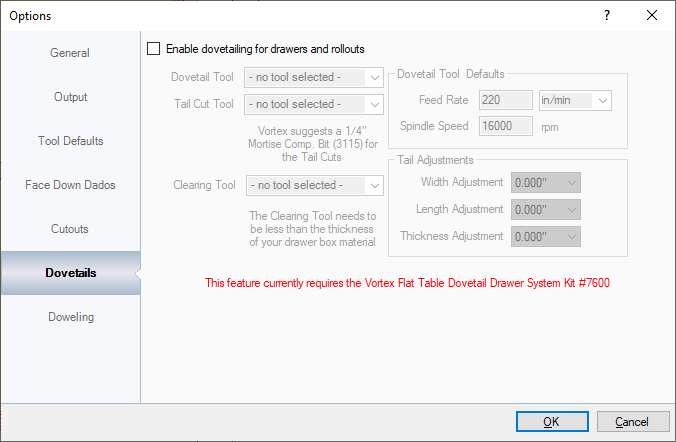
PLEASE NOTE: THIS SECTION REQUIRES THE VORTEX FLAT TABLE DOVETAIL DRAWER SYSTEM KIT #7600. All tools must be created in EnRoute or the Tools section before being used. Also, drawers must be set to DOVETAIL in the Standards in the Designer program for the parts to work correctly. Dovetail Tool: This sets the tool for cutting out the dovetails. Tail Cut Tool: This sets the tool on the opposing panel. Clearing Tool: This settings the tool used for clearing a path for the Dovetail and Tail Cut tools since those bits are not designed to plunge into the material. Dovetail Tool Defaults: This sets the default information for the feed and speed rates. Tail Adjustments: In some cases the dovetails may be a little too tight or loose fitting. This section adjusts the Width, Length, and Thickness by up to +/- 0.003". How to SetupNOTE: In the Designer, the Drawer Box Construction method in the Job or Cabinet Standards for Drawers CANNOT BE set to "Slide in Bottom (3 Sides)" or "Slide in Bottom (2 Sides)". It must be either "Dado Bottom 4 Sides" or "Flush Bottom". When creating the Dovetail Tool in the Tools section of the CNC Workshop or in EnRoute, the width of the bit must be measured at the widest part of the bottom section, including the inserts. The Tail Cut Tool is included in the kit as bit #3115 and should also be measured at the widest point of the cutting section. The last bit is the Clearing Tool. This cuts a slot that will go next to the drawer box parts to allow the Dovetail Tool and Tail Cut tool to cut into the parts since they are not designed to plunge into material. Because of that, the clearing bit must be less in width than the material thickness. |