|
|
|
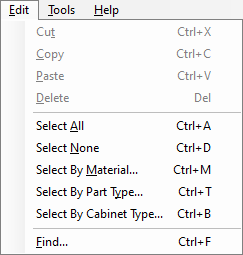
This menu is standard for most Windows applications. Please note that the button sequences next to each menu item are their short cut commands and can be pressed rather than use the mouse. An example of this is the Select All command can be done by holding down the Ctrl button on the keyboard and pressing the letter A while still holding down the Ctrl button. After the letter A has been pressed, the buttons can be released.
Note: If an item is not eligible to be selected, a warning will appear.
- Cut/Copy/Paste/Delete: These are standard commands for manipulating text within the program.
- Select All: This will select all of the parts displayed in the Cabinet Parts Section for exporting to EnRoute once the Export button has been clicked.
- Select None: This will de-select all of the parts displayed in the Cabinet Parts Section.
- Select By Material: This will bring up a list of all the materials that are used in the current job that has been imported. This list is broken down by material thicknesses in case the material is used for different parts.
- Select By Part Type: This will bring up a list of all the parts that are in the current job that has been imported. From there, individual parts can be selected for export. Remember, if all of the cabinets are displayed, then all of the selected parts from all of the cabinets will be ready for export, such as all Left and Right Panels, if those items are the ones selected.
- Select By Cabinet Type: This lists all cabinet types that are in the job that is currently brought in from the Designer. If a type is selected, all cabinet types in the current job and their parts will be selected.
|