|
|
|
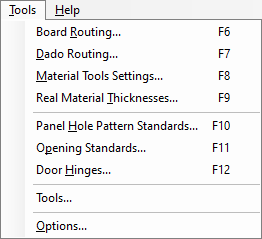
This menu is where tools and cut strategies are edited. This section contains a lot of information and the menus will be explained in greater depth on their own sections. For more information on those sections, click on the name to jump to those sections.
- Board Routing: The Board Routing section displays all of the Materials that are currently used in this job, broken up by material thickness.
- Dado Routing: The Dado Routing section is where dado strategies are created.
- Material Tools Settings: The Material Tools section is where tool strategies are modified, such as feed rate, plunge rate, number of passes, etc.
- Real Material Thicknesses: The Real Material Thickness section adjusts the thickness of specified material to fit the dados.
- Panel Hole Patterns Standards: This section sets either default hole patterns for each type of cabinet or for individual cabinet parts.
- Opening Standards: Opening standards is where hole patterns for Adjustable Shelves, Drawer Slide hole placement, and also Rollout hole patterns are set.
- Door Hinges: This section is specifically for setting up holes on side panels for hinge holes.
- Tools: This section displays tools that need to be or have been created (in cases of DXF) or read from EnRoute's Tool Library.
- Options: The Options section sets various information such as Tool Defaults, Stop Dados, Panel Through Cuts and more.
|